
Introduction
Artificial Intelligence (AI) is transforming how businesses operate, communicate, analyze data, and serve customers. Microsoft is bringing AI capabilities into everyday business applications, cloud platforms, software development tools, and enterprise workflows. From creating documents and analyzing data to developing intelligent applications, Microsoft AI tools help organizations explore new ways to improve productivity and streamline operations.
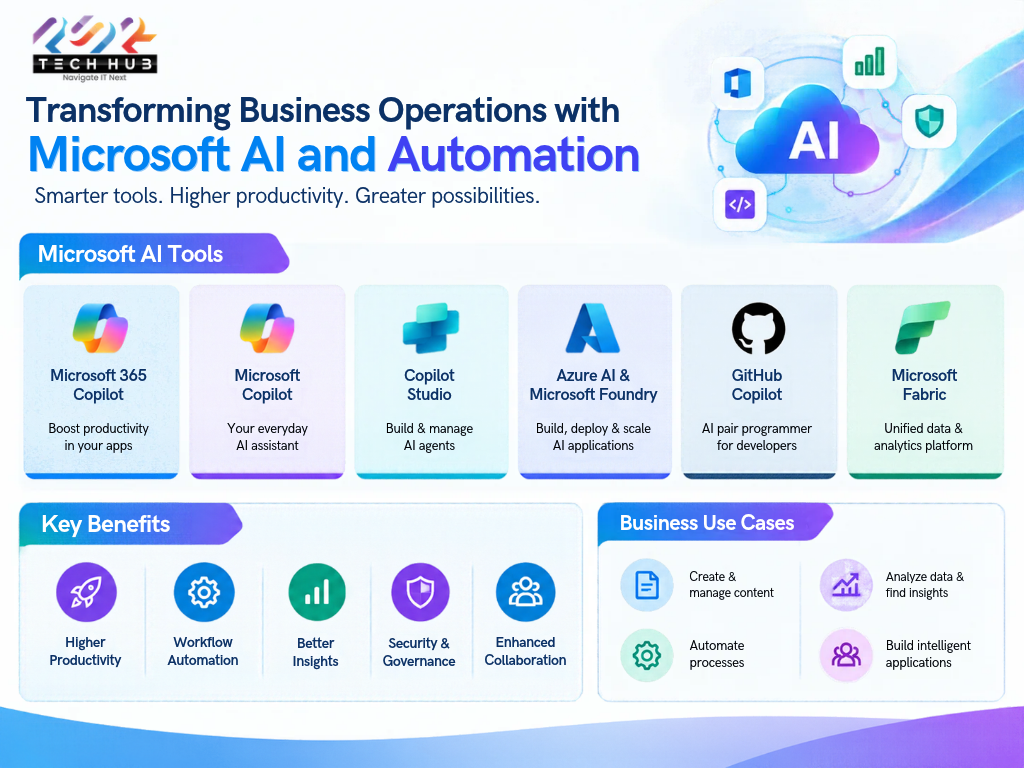
Businesses looking to adopt AI can explore solutions such as Microsoft 365 Copilot, Microsoft Copilot Studio, Microsoft Azure AI Foundry, GitHub Copilot, and Microsoft Fabric. Each tool supports different business needs, from everyday productivity to custom AI application development.
In this blog, we explore the major Microsoft Azure AI Foundry tools, their benefits, practical business applications, and how organizations can begin their AI adoption journey.
What Are Microsoft AI Tools?
Microsoft AI tools are a collection of artificial intelligence-powered applications, cloud services, and development platforms designed to help individuals and organizations work more efficiently.
These solutions combine AI capabilities with business applications and cloud infrastructure to support content creation, data analysis, workflow automation, software development, and customer engagement.
Organizations can use Microsoft AI solutions to:
- Automate repetitive and time-consuming tasks.
- Generate content, summaries, and business reports.
- Analyse business data and identify useful insights.
- Develop AI-powered applications and virtual assistants.
- Improve collaboration and employee productivity.
- Support secure and scalable digital transformation.
- Azure Foundry tools with Agentic experience with all industries.
The right Microsoft AI solution depends on an organization’s objectives, existing technology environment, security requirements, and budget.
Top Microsoft AI Tools for Businesses
1. Microsoft 365 Copilot
Microsoft 365 Copilot brings AI assistance into Microsoft 365 applications and work experiences. It can help employees draft content, summarize information, analyze data, and prepare presentations.
Key features:
- Microsoft Word: Draft, rewrite, and summarize documents.
- Microsoft Excel: Explore data, identify patterns, and assist with formulas and analysis.
- Microsoft PowerPoint: Help create presentations from prompts and existing content.
- Microsoft Outlook: Summarize email conversations and assist with drafting replies.
- Microsoft Teams: Summarize meetings and help organize discussions and action items.
Business use case: A sales team can use Copilot to summarize customer communications, prepare proposal drafts, organize meeting notes, and support follow-up activities.
Microsoft 365 Copilot can help reduce manual effort, allowing employees to spend more time on customer relationships, strategic planning, and decision-making.
2. Microsoft Copilot
Microsoft Copilot provides an AI assistant experience for asking questions, generating content, brainstorming ideas, and assisting with everyday tasks.
Depending on the version and licensing, users can access different features and integrations.
Key benefits:
- Generate ideas and draft written content.
- Summarize information and explain complex topics.
- Support research and planning activities.
- Assist with everyday work and problem-solving.
Business use case: Marketing professionals can use AI assistance to develop blog outlines, create campaign ideas, prepare social media content, and generate first drafts of business communications.
Organizations should select the appropriate Copilot offering based on their requirements for productivity, organizational data access, administration, and security.
3. Microsoft Copilot Studio
Microsoft Copilot Studio is a platform for creating and managing AI agents and conversational experiences. Businesses can build assistants that answer questions, connect to organizational knowledge, interact with supported systems, and automate selected processes.
Key features:
- Create custom AI agents for specific business needs.
- Connect agents to approved knowledge sources.
- Integrate with business systems and supported connectors.
- Automate multi-step workflows.
- Configure controls and monitor agent performance.
Business use case: An organization can develop an internal HR assistant that answers employee questions about company policies or an IT support agent that guides employees through common technical issues.
Copilot Studio is particularly useful for organizations seeking to create tailored AI experiences without developing every component from scratch.
4. Microsoft Azure & Microsoft Foundry: Powering Intelligent Applications
Microsoft Azure provides a comprehensive cloud infrastructure and AI services platform that enables organizations to develop, deploy, and scale intelligent applications.
Microsoft Foundry offers an integrated platform for building, evaluating, deploying, and governing AI applications and agents, with access to a diverse range of AI models, including:
- Claude Fable 5.1
- GPT-6 – Astra
- MAI-2.6
- DeepSeek V4 Flash
- Kimi K3 (FW)
- Qwen 3.8 27B
- MiniMax M3 (FW)
- Model Router
Together, Azure and Microsoft Foundry empower organizations to leverage advanced AI capabilities, streamline AI development, and build scalable, secure, and intelligent business solutions.
These capabilities are useful for businesses that need solutions beyond standard productivity assistants.
Key features:
- Build custom AI-powered applications.
- Integrate AI models into business software.
- Develop intelligent chatbots and AI agents.
- Process and analyze text, images, and other supported data.
- Deploy AI solutions using scalable cloud infrastructure.
- Apply monitoring, security, and governance controls.
Business use case: A company can develop an AI-powered knowledge assistant that helps employees find information across approved business documents, subject to configured access permissions and appropriate data controls.
Azure AI and Microsoft Foundry can support organizations building tailored solutions for customer service, document processing, enterprise knowledge management, and business process automation.
5. GitHub Copilot
GitHub Copilot is an AI-powered coding assistant designed to support software developers throughout the development process.
It can suggest code, explain existing code, assist with debugging, and help developers work with programming languages and development environments.
Key benefits:
- Generate code suggestions from natural-language prompts.
- Assist with debugging and code explanations.
- Support test creation and code documentation.
- Help developers explore unfamiliar codebases.
- Reduce repetitive coding tasks.
Business use case: A software development team can use GitHub Copilot to create initial code drafts, generate unit tests, and document functions more efficiently.
Developers must still review generated code for correctness, security vulnerabilities, performance, and compliance with organizational standards.
6. Microsoft Fabric
Microsoft Fabric is an analytics platform that brings together data engineering, data integration, data warehousing, real-time analytics, and business intelligence capabilities. Its AI-assisted experiences can help users explore data and generate insights.
Key benefits:
- Bring together data from different sources.
- Support analytics and reporting workflows.
- Help teams explore business trends.
- Integrate data analysis with Power BI experiences.
- Support data-driven decision-making.
Business use case: A business can analyze sales performance, customer trends, inventory movement, and operational metrics to help managers make informed decisions.
Organizations should establish sound data management practices before relying on AI-assisted analytics.
Key Benefits of Microsoft AI Tools
Improved Productivity
AI can assist with repetitive tasks such as drafting emails, summarizing documents, preparing reports, and organizing information. This helps employees focus on higher-value responsibilities.
Smarter Business Decisions
AI-powered analytics can help teams identify patterns, interpret information, and explore business performance. Human judgment remains essential when validating insights and making important decisions.
Workflow Automation
AI agents and automation tools can support selected workflows, including employee support, customer inquiries, document processing, and internal knowledge retrieval.
Enhanced Collaboration
AI features in collaboration and productivity applications can help employees summarize discussions, organize tasks, and access relevant information more efficiently.
Scalable Innovation
Cloud-based AI platforms enable businesses to develop and expand AI applications as their requirements evolve, subject to appropriate architecture, cost management, and governance.
Security and Governance
Microsoft offers security, identity, compliance, and governance capabilities across its technology ecosystem. However, protection depends on the specific services configured, licensing, permissions, and the organization’s security practices.
How Different Industries Can Use Microsoft AI
Microsoft AI tools can support a range of business functions and industries.
- IT and software development: Code assistance, application development, testing, and technical support.
- Healthcare: Administrative documentation, approved knowledge retrieval, and operational workflow support, with appropriate privacy and regulatory safeguards.
- Banking and finance: Document processing, reporting assistance, and analysis of financial information under suitable controls.
- Manufacturing: Operational reporting, maintenance knowledge retrieval, and process analysis.
- Retail and e-commerce: Customer support, product information assistance, and sales trend analysis.
- Human resources: Employee self-service assistants, recruitment administration, and internal policy information.
The suitability of each application depends on data quality, system integration, regulatory requirements, and the level of human oversight.
How to Choose the Right Microsoft AI Tool
Selecting the right solution begins with identifying the business problem rather than adopting AI simply because it is available.
- Define your objective: Determine whether you need productivity assistance, workflow automation, data analytics, or custom application development.
- Evaluate your existing environment: Review your Microsoft 365 subscriptions, Azure infrastructure, data sources, and business applications.
- Check licensing and costs: Compare eligible plans, usage-based charges, integration requirements, and implementation expenses.
- Assess security requirements: Review data access, identity management, permissions, privacy, and compliance needs.
- Start with a pilot: Test a practical use case with a small group and establish measurable success criteria.
- Measure business outcomes: Track time saved, process efficiency, output quality, user adoption, and operational costs before expanding.
A structured adoption strategy helps organizations choose appropriate tools and build a sustainable foundation for AI.
Best Practices for Implementing Microsoft AI Solutions
Successful AI adoption requires more than purchasing software. Businesses should establish clear objectives, prepare their data, train employees, and define governance practices.
Recommended practices include:
- Start with specific, measurable business challenges.
- Review data quality and access permissions before deployment.
- Train employees to use AI responsibly.
- Validate AI-generated content and recommendations.
- Establish policies for confidential and sensitive information.
- Monitor performance, accuracy, usage, and costs.
- Review the solution regularly as business requirements change.
AI should support employees and business processes, with appropriate human oversight for important decisions.
Conclusion
Microsoft AI tools are creating new opportunities for businesses to improve productivity, automate processes, strengthen analytics, and develop intelligent applications. From Microsoft 365 Copilot and GitHub Copilot to Copilot Studio, Microsoft Foundry, Azure AI services, and Microsoft Fabric, organizations can choose solutions aligned with their technology environment and business objectives.
The key to successful AI adoption is selecting the right tools, establishing proper security and governance, and focusing on measurable business outcomes.
PSR Tech Hub can help organizations explore Microsoft technology solutions and plan their digital transformation journey. Businesses interested in Microsoft AI adoption can evaluate their requirements, identify suitable solutions, and develop a practical implementation roadmap.
Ready to explore Microsoft AI solutions for your business?
Connect with PSR Tech Hub to discuss your organization’s productivity, automation, cloud, and AI requirements.